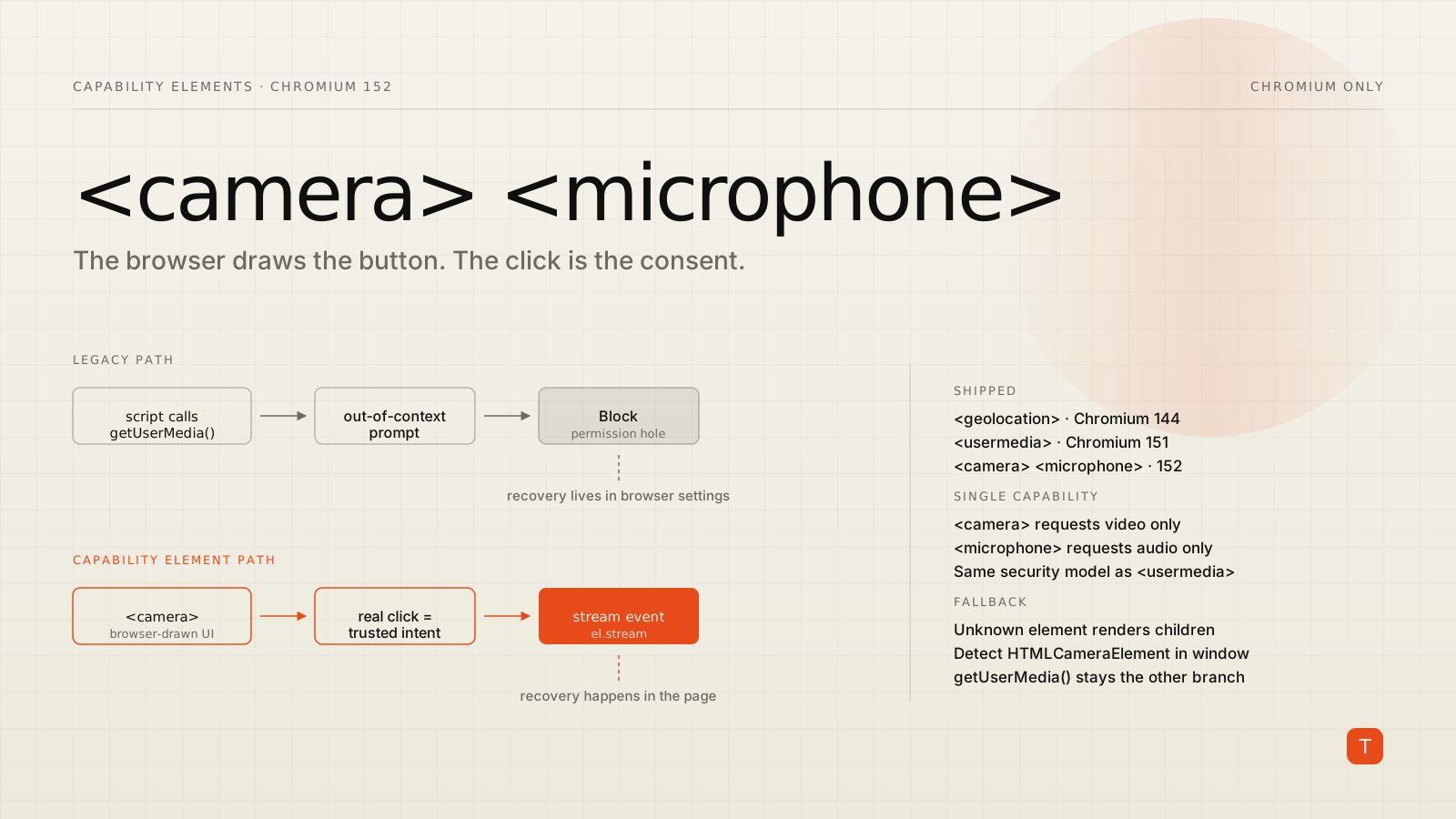
Every team that has shipped a video feature knows the permission hole. A user taps "Join call," your code calls getUserMedia(), the browser prompt appears, and the user — startled, mid-scroll, not yet sure what this site is — hits Block. From that moment on your application is stuck. The prompt will never appear again. Your only recourse is a modal that explains, in prose, where the camera toggle lives in the user's particular browser on the user's particular operating system. Most people close the modal.
Chromium's answer is to stop letting scripts ask. The <camera> and <microphone> HTML elements ship in Chromium 152, and appear in the Microsoft Edge 153 release notes for the September 10 release. They join <usermedia> (Chromium 151) and <geolocation> (Chromium 144) in what Chrome is calling the Capability Elements suite.
What a capability element actually is
It is a button the browser draws, not you. You place the tag; the browser renders a control with its own strictly constrained styling, listens for a real click on it, runs the permission flow, and then hands you the result. The element is not a permission toggle — it is a data mediator. <geolocation> gives you a position object. <usermedia>, <camera>, and <microphone> give you a MediaStream.
That last part is the piece people miss. There is no getUserMedia() call anywhere in the flow:
<camera id="cam">
  <button>Turn on camera</button>
</camera>
const cam = document.getElementById('cam');

cam.setConstraints({ video: { width: 1280, height: 720 } });

cam.addEventListener('stream', () => {
  preview.srcObject = cam.stream;
});

cam.addEventListener('error', () => {
  console.error(`Camera unavailable: ${cam.error?.name}`);
});

cam.addEventListener('cancel', () => {
  // User dismissed the prompt without choosing.
});
<camera> requests video capture only and <microphone> requests audio capture only. <usermedia> remains the element for the combined case. Per the Chromium intent to ship, the single-capability elements share the identical security model, styling constraints, and recovery path as <usermedia> — they exist because a podcast recorder asking for a microphone should not have to phrase that request as a generic media request.
The surface is small. stream and error are read-only properties, setConstraints() updates hardware preferences before the user interacts, and stream, error, and cancel are the events. That is the whole thing.
Why this changes the numbers, not just the ergonomics
The reduction in boilerplate is nice. The reason to care is what happens to users who already said no.
Because the prompt is gated on a click the browser itself observed on a control the browser itself rendered, the browser has a trustworthy signal of intent — which means it can offer a different flow than the one a script gets. Clicking a capability element after a previous denial triggers an in-page recovery flow, not a trip into chrome://settings.
Chrome's <usermedia> announcement published origin-trial numbers from partners:
- Cisco: users who had initially denied permission were about 10% likely to successfully grant it through legacy prompts; that rose to more than 65% with the element.
- Zoom: a 46.9% decrease in camera or microphone capture errors.
- Google Meet: a 17% decrease in "mic not working" feedback, and a 131% increase in successful permission recovery among users who had initially denied access.
These are vendor-reported figures from large products with dedicated support flows, so treat them as directional rather than as a benchmark you should expect to hit. But the direction is not surprising. The legacy path asks users to fix a browser setting; the new path lets them fix it where the problem is.
The styling constraints are the point, and they will annoy you
The browser will refuse to honor CSS that could make the control deceptive. In practice:
- Text and background must hit at least a 3:1 contrast ratio, and
opacityon the element must be1. width,height, andfont-sizeare bounded at both ends. Negative margins and outline offsets are disabled so the control cannot be visually clipped.transformaccepts only 2D translations and proportional scaling — no skewing the button into a sliver.- You do get state-based styling:
:hover,:active, and a:grantedpseudo-class that activates once permission is live and the stream is acquired.
If your design system leans on tight custom buttons, expect to lose an argument with the renderer. That friction is deliberate. A control the browser vouches for is only worth anything if the page cannot make it lie.
Design around it early. The cheapest version of this migration is one where the "enable camera" affordance is already a plain, legible, adequately sized button.
Feature detection and fallback
Browsers that do not know these elements treat them as HTMLUnknownElement and render their children, which is why the markup above nests a real <button> inside the tag. That gives you a working control everywhere and a browser-mediated one where it is supported:
<camera id="cam">
  <button id="cam-fallback">Turn on camera</button>
</camera>
function handleStream(stream) {
  preview.srcObject = stream;
}

if ('HTMLCameraElement' in window) {
  document
    .getElementById('cam')
    .addEventListener('stream', (event) => handleStream(event.target.stream));
} else {
  document.getElementById('cam-fallback').addEventListener('click', async () => {
    const stream = await navigator.mediaDevices.getUserMedia({ video: true });
    handleStream(stream);
  });
}
Check for the constructor, not the tag. document.createElement('camera') returns an object in every browser; only a supporting engine gives it the element interface.
The interop caveat you should plan around
Read the intent to ship carefully and the compatibility section is thin. Gecko: no signal. WebKit: no signal. The Chromium team's own availability expectation is that the feature is available only in Chromium browsers, with no known adoption elsewhere. It is also not shipping on all six Blink platforms — desktop and Android are the stated milestones.
So this is not a Baseline feature and will not be one soon. getUserMedia() is not going anywhere, and your fallback branch is not a temporary scaffold you delete next quarter; it is the code path a meaningful share of your users will run for years. Safari on iOS alone guarantees that for anyone with consumer traffic.
The honest framing: capability elements are a progressive enhancement that measurably improves recovery rates for the majority of desktop and Android Chromium users, at the cost of one extra branch and some design constraints. That is a good trade for a video product. It is probably not worth a refactor for a site whose camera usage is a rarely-touched avatar uploader.
What to do this month
If you ship real-time media, three concrete steps:
- Instrument the denial path before you change anything. Count how many users hit
NotAllowedErrorand how many of those ever come back and succeed. Without that baseline you cannot tell whether the element helped, and the partner numbers above will not transfer to your product. - Wrap your existing enable-media button in the element. The nesting pattern means this is additive — supporting browsers upgrade the control, everything else keeps the button you already have. Add the
HTMLCameraElement/HTMLMicrophoneElement/HTMLUserMediaElementdetection and route to your existinggetUserMedia()code otherwise. - Audit that button against the styling rules now. Contrast, opacity, sizing bounds, no exotic transforms. If it already complies, the element renders close to what you designed. If it does not, better to find out in a branch than in a bug report about a button that silently refuses to look right.
The broader trend is worth noting even if you skip the implementation. Permission prompts have been drifting away from scripts for a couple of years — quiet blocks, engagement heuristics, one-time grants. Capability elements are the constructive version of that drift: instead of the browser guessing harder about whether your script's request was legitimate, it gives you a way to prove it was.
Sources: Introducing the <usermedia> HTML element (Chrome for Developers), Intent to Ship: Capability elements <camera> and <microphone> (blink-dev), Microsoft Edge 153 web platform release notes, Media Capture Elements explainer (W3C).