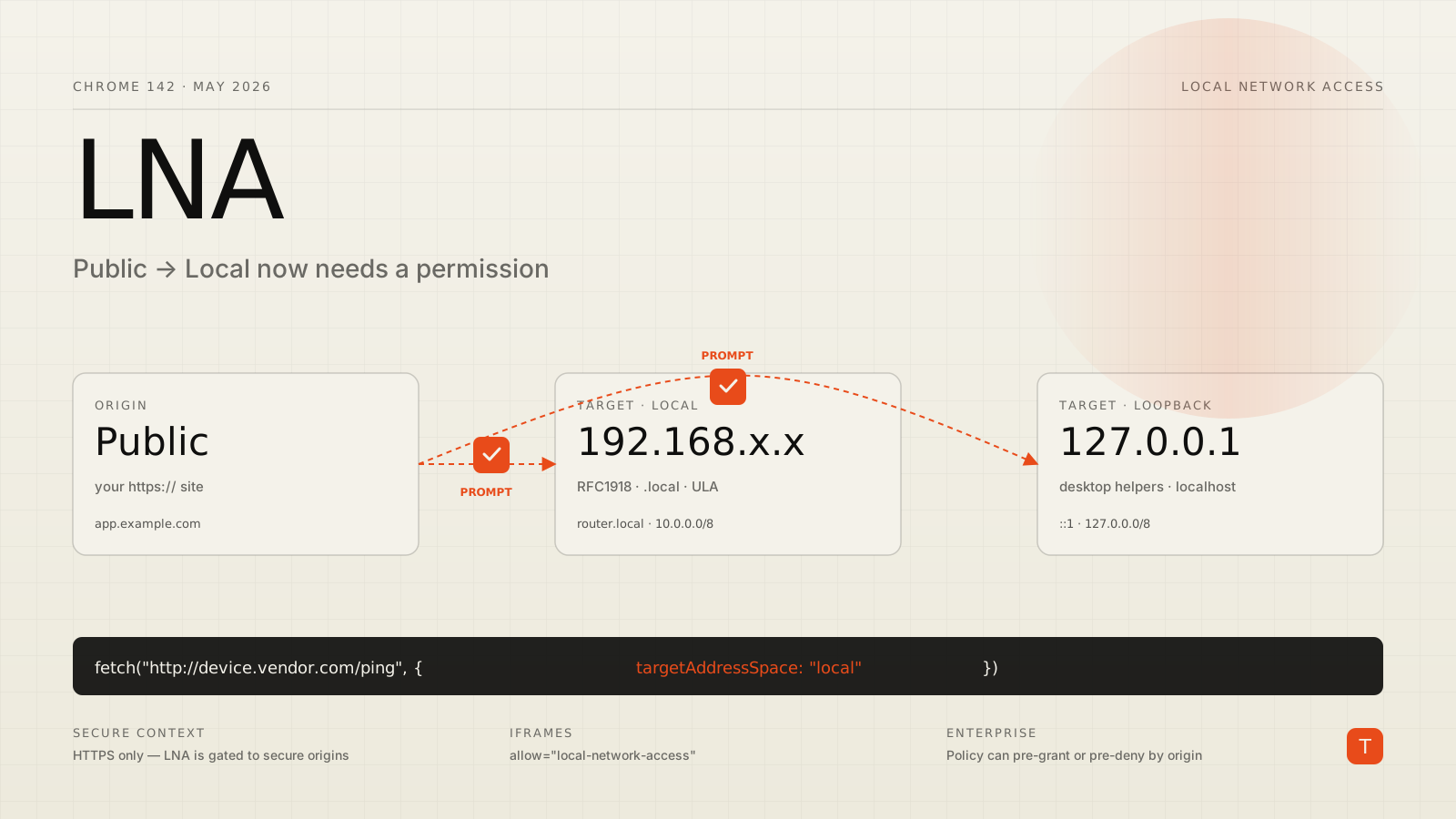
If you build software that talks to anything on a customer's network — a router admin UI, a desktop companion app on localhost, a printer, a Sonos, an industrial PLC, or a Microsoft Office task pane that connects back to its desktop sibling — Chrome 142 is now actively in your way. As of May 2026, every request from a public-web origin into a private IP range or to loopback is gated behind a new permission prompt, and a lot of integrations that worked yesterday are throwing what look like CORS errors today.
The change is called Local Network Access (LNA). It replaces the long-running Private Network Access effort that was put on hold in 2024, and the design is meaningfully different. PNA tried to make the target device opt in with CORS preflights. LNA puts the user in charge instead, with a permission prompt the first time a public origin reaches into a local destination.
The mental model: three address spaces
LNA reasons about every fetch in terms of three address spaces, defined in the WICG specification:
- Public — the open internet. Whatever your site is served from.
- Local — RFC1918 ranges (
10.0.0.0/8,172.16.0.0/12,192.168.0.0/16), the link-local block (169.254.0.0/16), IPv6 ULA (fc00::/7), IPv6 link-local (fe80::/10), and.localmDNS names. - Loopback —
127.0.0.0/8and::1.
The rule is simple to state: public → local or public → loopback triggers LNA. Local → local does not (yet — the Chrome team has said this is coming). The trigger is global: fetch(), subresource loads, and subframe navigations all count. WebSockets, WebTransport, and WebRTC are exempt in this first milestone but will be folded in shortly.
If the user has not previously granted permission for your origin, the request fails. If they grant it, the origin is allowed to reach local destinations for as long as the permission persists.
Why this also looks like an HTTPS problem
A lot of local devices serve HTTP, not HTTPS — router admin pages, IP cameras, on-prem appliances. Normally an HTTPS page can't make plaintext fetches at all (mixed content). LNA carves out a narrow exemption to make that workable: a request is exempt from mixed-content blocking if Chrome can tell before DNS resolution that the destination is local.
Chrome knows up front in exactly three cases:
// 1. Private IP literal — exempt from mixed content
fetch("http://192.168.0.1/ping");

// 2. .local hostname — exempt from mixed content
fetch("http://router.local/ping");

// 3. Public hostname that resolves to a private IP — NOT exempt,
//    even though the destination ends up on the local network
fetch("http://example.com/ping");

// 4. Public hostname plus the new targetAddressSpace hint — exempt
fetch("http://example.com/ping", {
  targetAddressSpace: "local",
});
The fourth example matters more than it looks. Plenty of vendors ship a public DNS name (device.vendor.com) that resolves via DHCP or split-horizon DNS to a customer's local IP. Without the targetAddressSpace hint, those requests look public-to-public to Chrome until DNS comes back, miss the exemption window, and get blocked as mixed content from your HTTPS page.
What actually breaks
The bug reports rolling in over the last two weeks paint a consistent picture. The Dynamsoft team documented that document-scanning SDKs that talk to a desktop helper on 127.0.0.1 now require either user-granted permission or one of the workarounds below. The Office team reported that production Office Add-ins lose their connection to the desktop applications they pair with because the hosting iframe lacks the new Permissions-Policy entry. Smart-home dashboards that scrape a Hue Bridge or a Sonos device are getting the same prompt every fresh session, sometimes silently denied if the user dismisses too fast.
If you wrap your existing failure handler around a generic CORS error message, the user sees nothing useful. Chrome's prompt is its own UI; the failure path on the JS side just looks like a network error.
The migration checklist
Five concrete moves cover most production apps:
Serve the calling page over HTTPS. LNA is restricted to secure contexts. There is an origin-trial-based escape hatch announced for sites that need extra runway, but treat HTTPS as the destination, not the negotiation.
Annotate fetches that will go local. If your code talks to device.vendor.com and that name resolves to RFC1918 space, add targetAddressSpace: "local" to the fetch options. Same for loopback when you're hitting localhost or a public name that resolves to 127.0.0.1. The annotation is a hint to Chrome about what to expect, and it's the difference between a prompt and a hard mixed-content block.
Add a Permissions-Policy entry to any iframe that needs LNA. Without allow="local-network-access", an embedded iframe will be blocked from making local-network requests even if the top-level page has permission. This is the trap that broke Office Add-ins:
<iframe
  src="https://addin.example.com/"
  allow="local-network-access"
></iframe>
Treat permission denial as a first-class state. Show real UI when the user denies or dismisses. The Permissions API lets you query the current state and react before you fire the fetch:
const status = await navigator.permissions.query({
  name: "local-network-access",
});

if (status.state === "denied") {
  showLocalAccessExplainer();
} else {
  await connectToLocalDevice();
}
For managed environments, use the Chrome enterprise policy. Chrome ships a policy that lets administrators pre-grant or pre-deny LNA for specific origins, so you don't show the prompt at all on managed devices. Production-deployed SaaS dashboards inside a corporate network are the obvious case — your customer's IT team can roll out the policy via Group Policy or the equivalent MDM channel, and the prompt simply doesn't appear.
Why the change is worth living with
It's tempting to read this as Chrome breaking the web again. The CSRF risk LNA closes is real, and largely invisible to users: a public site you happened to visit could, before LNA, fire a request at 192.168.1.1/admin/wifi?password=... and a non-trivial number of routers would do what it asked. Other operating systems — Android, iOS, macOS — have shipped a local-network permission for years. The web was the holdout, and the holdout always lost in the end.
The smarter framing is: every place in your codebase that makes a public-to-local request just became a deliberate user moment. That's a UX problem you can solve with copy, fallbacks, and a sensible enterprise-policy story for the IT-managed installs that don't want a prompt. It is not a problem you can solve by retrying the fetch.
Actionable takeaways
Three things worth doing this week:
First, audit your codebase for fetches to private IP literals, .local names, localhost, 127.0.0.1, or public hostnames that you know resolve into a customer network. Each one is a candidate for the targetAddressSpace annotation and a friendly explainer in the UI.
Second, in Chrome 142, force the strict path with chrome://flags/#local-network-access-check set to "Enabled (Blocking)" and run your full integration suite. The flag is now the same as default behavior, but it's still the cleanest switch to confirm you've hit every code path.
Third, if you ship to enterprises, get the LNA enterprise policy in front of your customer's IT contact before they get the first support ticket. A pre-granted origin in their Chrome management console is worth a hundred lines of fallback code.
The web platform spent ten years pretending that "I can fetch anything that resolves" was a workable security model. Chrome 142 closes that gap. The code you write to live inside the gap is short. Write it once, treat the permission as part of your onboarding flow, and you can forget LNA exists.