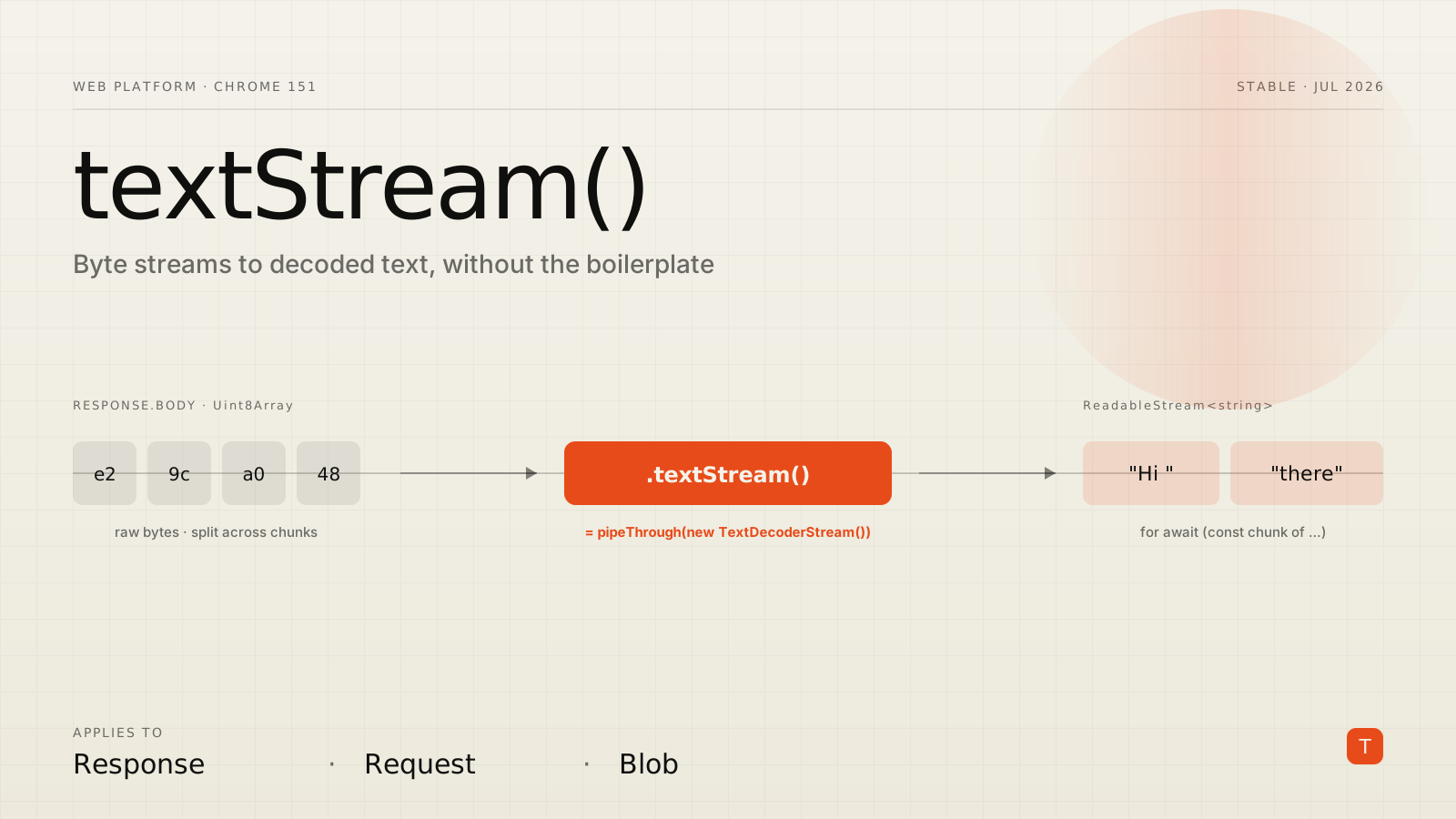
Streaming text into a page is one of those tasks that shows up everywhere now — chat UIs rendering LLM tokens as they arrive, log viewers tailing a server, progressive HTML that paints before the response finishes. And for years the first three lines of every one of those handlers were the same piece of ceremony: grab response.body, pipe it through a TextDecoderStream, then finally start reading strings.
Chrome 151, which reached stable on July 28, 2026, collapses that ceremony into a single method call. The release notes add a textStream() method to the three interfaces that represent a byte stream — Response, Request, and Blob. It is a small API, but it touches code that nearly every modern front end runs, and it removes a class of subtle bugs along the way.
What actually changed
Every fetch() response body is a ReadableStream of Uint8Array chunks — raw bytes, not text. To read those bytes as strings you have to decode them, and decoding correctly across chunk boundaries is trickier than it looks. A multi-byte UTF-8 character can be split across two network chunks, so you cannot just call new TextDecoder().decode() on each chunk independently and concatenate the results. TextDecoderStream exists precisely to handle that: it is a transform stream that buffers partial code points and only emits complete characters.
Before Chrome 151, wiring that up looked like this:
const response = await fetch("/api/stream");
const textStream = response.body.pipeThrough(new TextDecoderStream());

for await (const chunk of textStream) {
  console.log(chunk); // decoded string
}
With textStream(), the plumbing disappears:
const response = await fetch("/api/stream");

for await (const chunk of response.textStream()) {
  console.log(chunk); // decoded string
}
Per the release notes, textStream() is "a convenient shorthand equivalent to piping the byte stream through a TextDecoderStream()." It returns a ReadableStream of decoded string chunks, and because readable streams are async-iterable in Chrome you can consume it with a plain for await...of loop. The method is being standardized through WHATWG Fetch PR #1862, so this is a spec-track addition to the Body mixin rather than a Chrome-only convenience.
The same method exists on Request and on Blob, which matters more than it first appears. Blob.textStream() gives you a streaming counterpart to the existing Blob.text() — you can process a large uploaded file chunk by chunk instead of pulling the entire thing into one string in memory.
Why the boilerplate mattered
The old pattern was not just verbose; it was easy to get wrong in ways that only surfaced under real traffic.
The most common mistake was decoding chunks manually with a fresh TextDecoder per chunk. That works fine in a demo where every character is ASCII, then corrupts emoji, accented characters, or any non-Latin script the moment a code point lands on a chunk boundary. Teams shipping to international users hit this and spend an afternoon tracking down mojibake that only reproduces on slow connections, because chunk boundaries depend on network timing.
A second papercut was forgetting that response.body can be null — for example on a 204 No Content or a response constructed without a body. Reaching straight for .pipeThrough() throws in those cases, so defensive code grew a guard clause around the pipe.
textStream() folds the correct behavior into the platform. You get proper streaming UTF-8 decoding by default, and one obvious method to reach for instead of a two-step pipe that invites shortcuts.
Where it pays off: token streaming
The clearest win is the pattern behind every streaming AI feature. A server sends tokens over a long-lived response, and the UI appends them as they arrive. Here is a compact, correct consumer:
async function streamInto(el, url, signal) {
  const response = await fetch(url, { signal });

  if (!response.ok || !response.body) {
    throw new Error(`Bad stream: ${response.status}`);
  }

  for await (const chunk of response.textStream()) {
    el.append(chunk); // paint tokens as they land
  }
}
If your endpoint speaks Server-Sent Events or newline-delimited JSON, you still need to split the decoded text on your delimiter — textStream() decodes bytes to strings, it does not parse your framing. But it hands you a clean string stream to split, which is exactly the layer you want to work at:
async function* lines(response) {
  let buffer = "";
  for await (const chunk of response.textStream()) {
    buffer += chunk;
    let nl;
    while ((nl = buffer.indexOf("\n")) !== -1) {
      yield buffer.slice(0, nl);
      buffer = buffer.slice(nl + 1);
    }
  }
  if (buffer) yield buffer; // trailing partial line
}

for await (const line of lines(await fetch("/api/ndjson"))) {
  const event = JSON.parse(line);
  render(event);
}
Notice that the buffering here is about your line protocol, not about character decoding. The decoder-level correctness is already handled, so the code you write is the code that is actually specific to your app.
Progressive enhancement, not a hard dependency
textStream() shipped in Chrome 151 and is on the standards track, but as of this writing it is not yet available everywhere. Treat it as an enhancement with a one-line fallback to the method it replaces:
function textStreamFrom(response) {
  if (typeof response.textStream === "function") {
    return response.textStream();
  }
  // Fallback: the exact operation textStream() is shorthand for
  return response.body.pipeThrough(new TextDecoderStream());
}

const response = await fetch("/api/stream");
for await (const chunk of textStreamFrom(response)) {
  handle(chunk);
}
Because the new method is defined as the equivalent of the pipe, this fallback is behavior-identical — there is no feature gap to reason about, only a syntax difference. That makes it safe to adopt today: modern Chrome takes the fast path, everything else takes the path you already ship.
A note on Blob streaming
The Blob variant deserves a second look for anything file-heavy. If you accept CSV, NDJSON, or log uploads in the browser, Blob.text() forces the whole file into a single string before you can touch it — fine for a few kilobytes, painful for hundreds of megabytes. textStream() lets you process as you read:
const file = input.files[0];
let rows = 0;

for await (const chunk of file.textStream()) {
  rows += (chunk.match(/\n/g) || []).length;
}

console.log(`Counted ${rows} rows without buffering the file`);
You keep memory flat regardless of file size, and the code stays as readable as the all-at-once version.
Takeaways
textStream() is a small, well-scoped addition, and that is the point. The value is not a new capability — you could always pipe through TextDecoderStream — but in removing a repeated, error-prone step from a pattern that now appears in most production front ends.
If you are working on streaming UI today, three concrete moves: wrap the method in a textStreamFrom() helper with the TextDecoderStream fallback so you can adopt it without dropping older browsers; audit any existing handler that decodes chunks with a bare TextDecoder per chunk, because that code has a latent multi-byte bug; and reach for Blob.textStream() anywhere you currently load an entire uploaded file into memory before parsing it. None of these require a rewrite — they are the kind of quiet cleanup that makes streaming code both shorter and more correct.
For the full list of what else shipped alongside it, the Chrome 151 release notes cover the rest, and the WHATWG Fetch pull request tracks the standardization work across browsers.