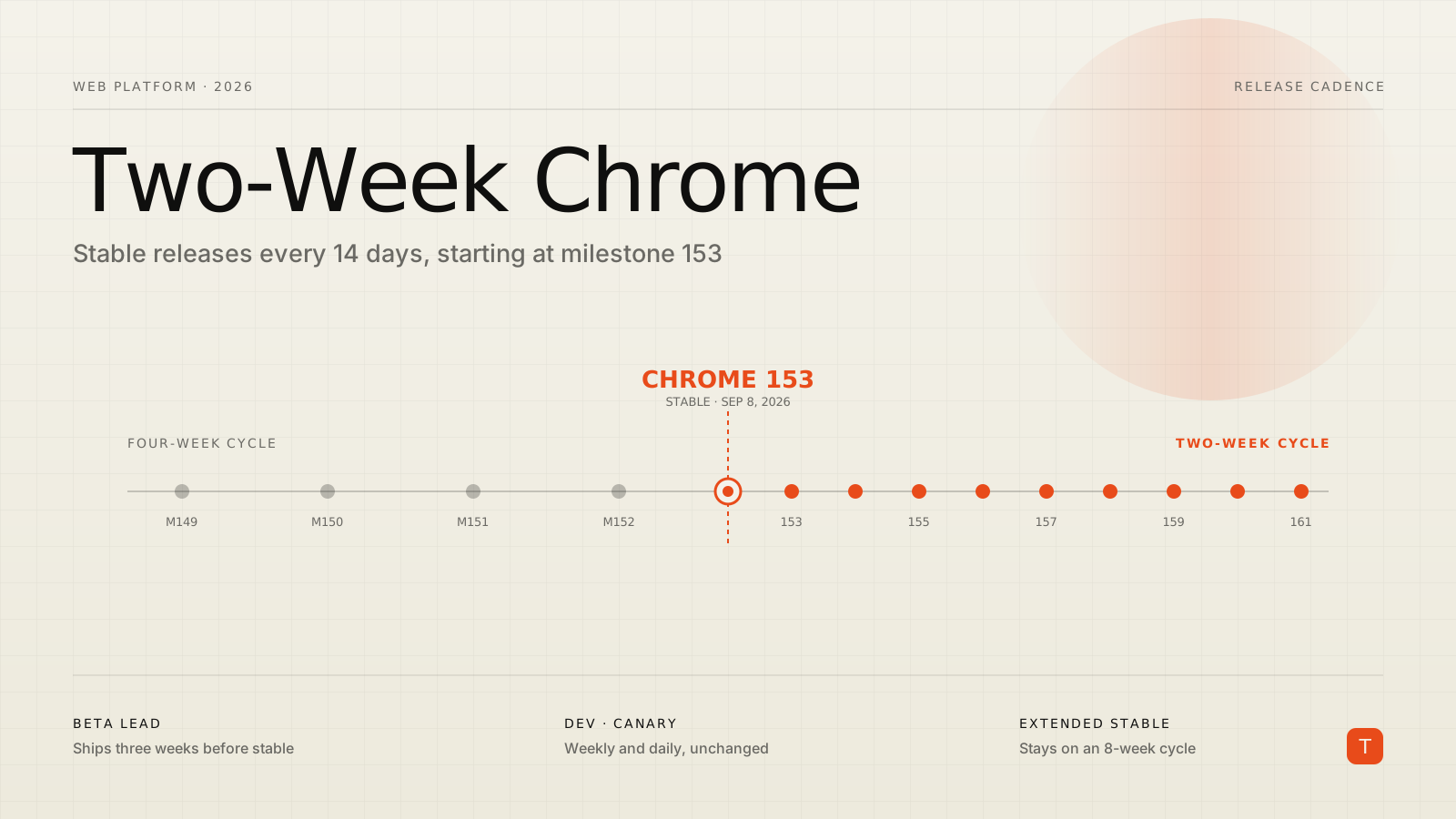
Chrome is about to start shipping twice as often. Beginning with Chrome 153 on September 8, 2026, the browser moves from its long-standing four-week release cadence to a two-week one. A new stable milestone every fourteen days, across desktop, Android, and iOS. If you build for the web, that headline reads two ways at once — faster access to new capabilities, or twice as many chances for something to break. The reality is more boring and more manageable than either, and it's worth understanding before the first biweekly release lands.
What actually changes
The mechanics are simple. Since 2021 Chrome has cut a new milestone every four weeks; from Chrome 153 onward, that interval halves. In practice the schedule shifts forward: under the old calendar, Chrome 153 stable wouldn't have arrived until September 22, and Chrome 154 not until late October. Under the new one, 153 ships September 8, 154 follows on September 22, and 155 lands October 6 — three major versions in the span of a month.
A few things do not change, and they matter more than the cadence itself:
- Dev and Canary channels stay as they are — Canary daily, Dev weekly. Only Beta and Stable move to the two-week rhythm.
- Chrome Beta now ships three weeks before each stable release, down from four. That's still a real testing window ahead of every version.
- Extended Stable stays on its eight-week cycle. This is the channel built for enterprise administrators and Chromium embedders who need more time between updates, and it isn't going anywhere.
So the arithmetic that gets quoted — 26 Chrome releases a year instead of 13 — is accurate, but it describes the Stable channel specifically. The overall release machinery, the channels you already test against, and the escape hatch for locked-down fleets are all intact.
Why Google is doing this
Chrome's cadence has been accelerating for fifteen years: a six-week cycle from 2010, four weeks starting in 2021, and now two. Google's stated reasoning is that a smaller release scope is easier to stabilize and easier to debug after the fact — when only two weeks of changes ship at once, a regression has a much smaller haystack to hide in. The company also introduced weekly security updates in 2023 and an early-stable rollout to raise release quality, so the infrastructure for shipping faster has been maturing for a while.
There's a competitive read on this too. Chromium-derived browsers now iterate quickly, and shipping web-platform features faster keeps Chrome at the front of that pack. You don't need to accept the framing to plan around the outcome: new CSS properties, JavaScript APIs, and browser capabilities will reach Chrome stable sooner and more often, while Firefox stays on a four-week cycle and Safari ships a couple of meaningful updates a year tied to OS releases. The gap between "available in Chrome" and "available everywhere" is about to get wider on average, not narrower.
What it means for how you test
If your team relies on manual QA, a two-week cadence is genuinely harder to keep up with. Fourteen days between stable versions leaves little room for a human to click through a regression suite before the next one arrives. The honest answer is that manual browser testing on Chrome's stable channel was already fragile at four weeks; two weeks makes automation non-optional rather than nice-to-have.
The good news is that the fix is the same discipline you'd want regardless of Chrome's schedule: test against Beta in CI. Because Beta leads stable by three weeks, a breaking change shows up in your pipeline before it reaches your users. Most runners make this a one-line change. In Playwright, you add the Beta channel as a project:
// playwright.config.ts
import { defineConfig, devices } from "@playwright/test";

export default defineConfig({
  projects: [
    {
      name: "chrome-stable",
      use: { ...devices["Desktop Chrome"], channel: "chrome" },
    },
    {
      name: "chrome-beta",
      use: { ...devices["Desktop Chrome"], channel: "chrome-beta" },
    },
  ],
});
Run the Beta project on a schedule — nightly, or weekly — and you get an early warning system for exactly the class of problem the faster cadence creates, without adding a person to the loop. Pair it with real-user monitoring so that if something does slip through, you see it in field data broken down by browser version rather than in a support ticket.
Why it matters less than it sounds
Here's the part the "testing burden doubles" takes tend to skip. For most teams, the day a feature lands in Chrome stable is not the day you start using it. You build on features that are safe across browsers, and the tool for reasoning about that is Baseline.
Baseline classifies a web feature as Newly available once it works in the current stable versions of all major engines — Chrome, Edge, Firefox, and Safari — and as Widely available once it's been interoperable across that set for 30 months. That definition is deliberately decoupled from any single browser's release schedule. Chrome shipping a feature two weeks earlier doesn't move the Baseline needle unless the other engines move too. If your support policy targets Widely available features, Chrome's cadence is nearly irrelevant to what you ship; if you target Newly available, you were already writing feature detection.
And feature detection is what makes the whole question a non-event. Guard anything that isn't universal, and a browser that gained — or lost — a capability between releases is handled without a code change on your side:
@supports (anchor-name: --anchor) {
  .tooltip {
    position-anchor: --anchor;
    /* enhanced positioning where it's supported */
  }
}
// Prefer capability checks over version or user-agent sniffing
if ("startViewTransition" in document) {
  document.startViewTransition(() => render(nextState));
} else {
  render(nextState); // identical result, no animation
}
Progressive enhancement turns "Chrome changed something" from an incident into the system working as designed. The layout, the data, the core task all stay identical; only the enhancement flexes. That posture costs you nothing extra and it's what makes a faster-moving platform safe to sit on.
A practical playbook
The move to biweekly releases is a good excuse to tighten a few habits that pay off no matter what any browser vendor does next:
- Put Chrome Beta in CI. Three weeks of lead time is a gift; use it. An automated run against Beta catches breaking changes before your users do.
- Write feature detection, not version checks.
@supports,inchecks, andCSS.supports()are stable ground. User-agent and version strings are quicksand, and they get worse when versions churn every two weeks. - Anchor your support policy to Baseline, not to Chrome. Decide whether your product targets Widely available or Newly available features, document it, and let that — not the newest Chrome number — drive what you adopt.
- Route conservative fleets to Extended Stable. If you ship internal tools to an enterprise on managed devices, the eight-week Extended Stable channel exists precisely so their update pace and yours can differ. Recommend it explicitly instead of assuming everyone rides stable.
- Track dates from the source. The Chromium Dashboard schedule and Chrome's release notes are the authoritative calendar. Wire the milestone dates into wherever your team plans, so a release is never a surprise.
Takeaways
Chrome's two-week cadence is a real change to the platform's rhythm, but for a team with sound engineering practices it's closer to a scheduling detail than a threat. The faster clock rewards automation and punishes manual QA and user-agent sniffing — which were already the wrong bets. Add Beta to your test matrix for the three-week early warning, lean on Baseline to decide what's safe to use rather than watching the Chrome version number, and gate anything non-universal behind feature detection so a mid-cycle change resolves itself. Point enterprise deployments at Extended Stable when they need a slower pace. Do those things and September 8 comes and goes without incident, while you get new web-platform capabilities sooner. That's the trade the faster cadence actually offers, and it's a good one if your pipeline is ready to take it.
Sources: Chrome for Developers: Get features faster with Chrome's two-week release cycle · Chromium Dashboard: Release schedule · web.dev: Baseline