For all its evolution, HTML still arrives the way it always has: top to bottom, in order, regardless of when each piece of content is actually ready. That ordering is the quiet tax behind a lot of performance work. Teams either hold a response back until the slowest database query finishes, or they reach for a framework and a pile of client-side DOM manipulation to paint content as it trickles in. Neither is free.
Chrome is now testing a platform-level answer. Under the umbrella name Declarative Partial Updates, the Chrome team has shipped two related API sets for developer testing in Chrome 148, behind the chrome://flags/#enable-experimental-web-platform-features flag. The work was detailed by Barry Pollard and Noam Rosenthal and previewed as part of the Google I/O 2026 Chrome roundup. It is early, but the direction is worth understanding now, because it targets a problem nearly every content-heavy site has.
The problem: HTML is rigidly in-order
CSS can reorder content visually, but doing so often creates accessibility problems because the DOM order and the visual order diverge. JavaScript can rewrite the DOM through innerHTML, insertAdjacentHTML, and friends, but those APIs require you to have the full chunk of HTML in hand before you insert it, and each behaves slightly differently around sanitization and script execution.
The result is that streaming, one of HTML's genuine strengths, gets underused. If the top of your page is ready but a personalized panel needs a slow lookup, the in-order model pushes you to either stall the whole stream or stitch the panel in later with custom JavaScript. Declarative Partial Updates attacks both halves of that: out-of-order delivery in the markup itself, and a cleaner, streamable set of insertion methods in JavaScript.
Part one: out-of-order streaming in markup
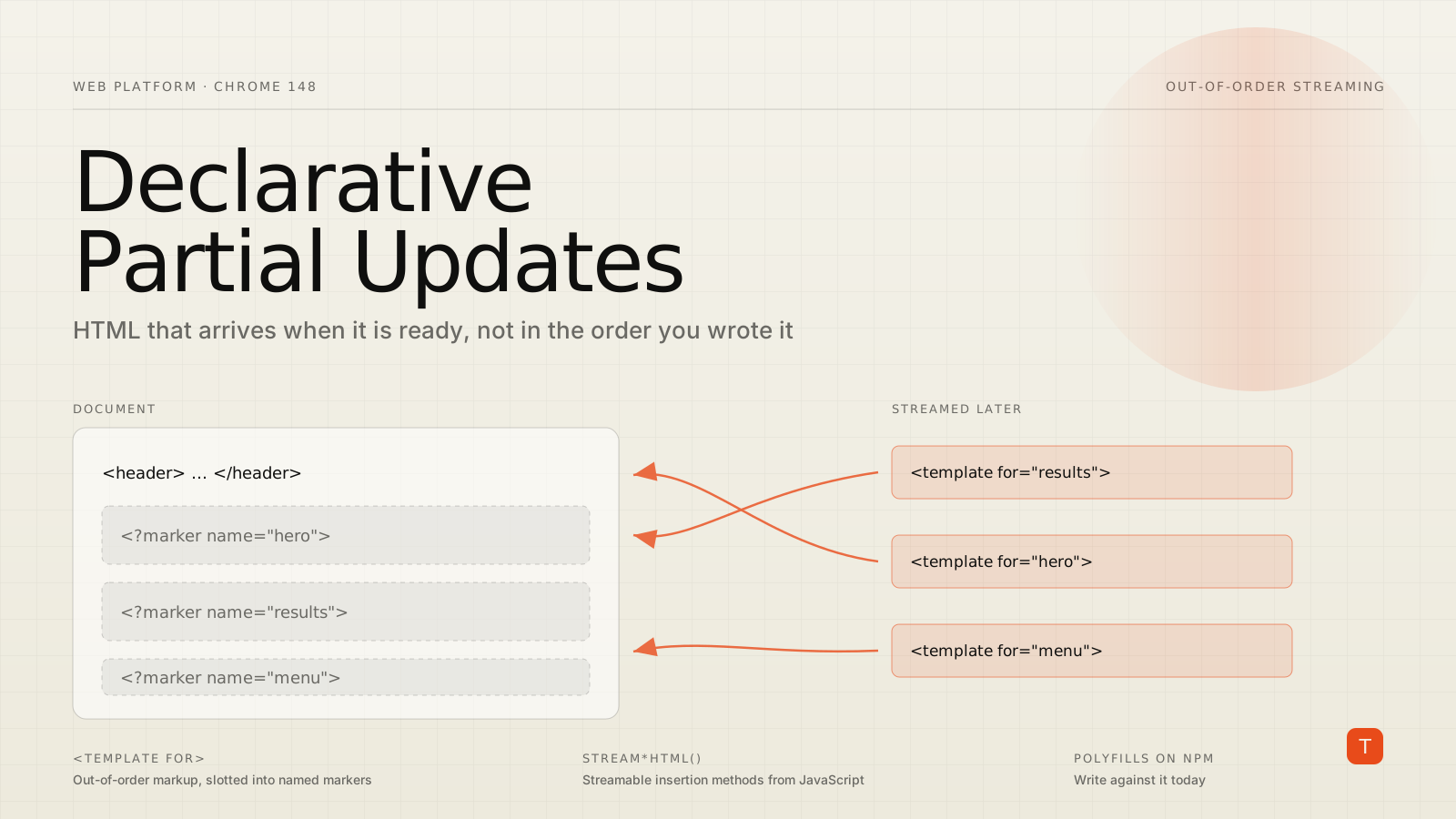
The first API set lets the HTML stream itself carry content out of order, using the <template> element together with new processing-instruction placeholders. You drop a named marker where content should eventually land, then send a matching <template for> later in the stream:
<div>
  <?marker name="placeholder">
</div>

<!-- ...later in the same stream... -->

<template for="placeholder">
  Here is some <em>HTML content</em>!
</template>
When the parser reaches the <?marker> it does nothing immediately, much as it has always treated processing instructions as comments. The difference is that the marker is now addressable. When the matching <template for="placeholder"> arrives, the browser replaces the marker with the template's content, leaving:
<div>
  Here is some <em>HTML content</em>!
</div>
If you want a placeholder to show while the real content is still in flight, use the <?start> and <?end> range markers:
<div>
  <?start name="another-placeholder">
  Loading…
  <?end>
</div>

<!-- ...later... -->

<template for="another-placeholder">
  Here is some <em>HTML content</em>!
</template>
The Loading… text renders right away and is swapped out once the template streams in. Markers can also append repeatedly, which is what makes streaming a list practical. Each template carries the next item plus a fresh marker for whatever comes after:
<ul id="results">
  <?start name="results">
  Loading…
  <?end>
</ul>

<template for="results">
  <li>Result One</li>
  <?marker name="results">
</template>

<template for="results">
  <li>Result Two</li>
  <?marker name="results">
</template>
The final marker stays in place so additional <template for="results"> blocks can keep filling the list later.
Where this pays off
The compelling use cases are the ones where ordering is currently a barrier:
- Island architecture without a framework. The pattern popularized by Astro, where independent components sit on top of static HTML, maps cleanly onto
<template for>. You can express islands directly in markup, and frameworks can still build on the same primitive for interactive components. - Send content the moment it is ready. Stream the static shell immediately, and slot in the expensive parts, such as a personalized panel that needs a database round trip, at the end of the stream rather than holding the whole document hostage to the slowest query.
- Deliver HTML in load-optimal order. A mega menu carries a lot of markup the user will not see until the page is interactive. With markers you can send it late in the document and prioritize the HTML that matters for first paint, without changing where it ends up in the DOM.
A couple of restrictions are worth filing away. A <template for> can only update markers within the same parent element, for security reasons, so placing one directly on <body> is what grants document-wide reach. And moving markers after a template has begun streaming into them can produce surprising results.
Part two: a cleaner, streamable set of insertion methods
Not everything can be expressed in the initial HTML, so the second API set cleans up dynamic insertion from JavaScript. Today's options, setHTML, setHTMLUnsafe, innerHTML/outerHTML, createContextualFragment, and insertAdjacentHTML, differ in whether they overwrite or append, whether they sanitize, and whether scripts run. Few developers can recite those answers for each method, and none of them stream.
Chrome proposes a consistent matrix instead. Six actions, each with a static form and a streaming equivalent:
| Action | Static | Streaming |
|---|---|---|
| Set the element's contents | setHTML(html, options) |
streamHTML(options) |
| Replace the entire element | replaceWithHTML(html, options) |
streamReplaceWithHTML(options) |
| Add HTML before the element | beforeHTML(html, options) |
streamBeforeHTML(options) |
| Add HTML as the first child | prependHTML(html, options) |
streamPrependHTML(options) |
| Add HTML as the last child | appendHTML(html, options) |
streamAppendHTML(options) |
| Add HTML after the element | afterHTML(html, options) |
streamAfterHTML(options) |
The static form is what you would expect:
const contentElement = document.querySelector('#content-to-update');
contentElement.setHTML('<p>This is a new paragraph</p>');
The streaming form is the new capability. It works with the Streams API, so you can write chunks over time:
const contentElement = document.querySelector('#content-to-update');
const writer = contentElement.streamHTMLUnsafe().getWriter();

let i = 0;
while (true) {
  await writer.write(`<p>${++i}</p>`);
  await new Promise((resolve) => setTimeout(resolve, 1000));
}
writer.close();
Or pipe a fetch response straight into the element, no buffering the whole payload first:
const contentElement = document.querySelector('#content-to-update');
const response = await fetch('/api/content.html');

response.body
  .pipeThrough(new TextDecoderStream())
  .pipeTo(contentElement.streamHTMLUnsafe());
By default the safe methods run the default sanitizer, and you can pass a custom Sanitizer through options. There are Unsafe variants of every method that switch the sanitizer off and accept a runScripts option, which defaults to false. As the Chrome team frames it, "unsafe" is a reminder to think about trust and sanitization, not a warning to stay away.
Using both together
The two API sets are designed to combine. Because streamHTMLUnsafe processes <template for> instructions as they arrive in the main document, you can stream new templates into a page and let them slot into existing markers, without holding a separate JavaScript reference to each target. A lightweight SPA navigation, for instance, can load an outline page full of markers and then stream each route's templates to the bottom of the document to fill them in.
Try it without waiting for ship
This is experimental and Chrome-only today, but you do not have to sit on your hands. The Chrome team has published two polyfills on npm: template-for-polyfill for the markup API and html-setters-polyfill for the insertion methods. Note the trade-offs: the setters polyfill buffers rather than truly streams, so it polyfills the API shape more than the performance behavior, and the safe paths lean on the Sanitizer API, which Safari does not support. Treat these as a way to write against the future API surface, then test across browsers.
Takeaways
If you maintain a content-heavy site or an SPA, three moves make sense now. First, audit where you currently stall a response or run custom DOM-stitching code to paint late-arriving content; those are exactly the spots Declarative Partial Updates is built for. Second, prototype one slow panel behind the Chrome flag or the polyfill to feel out the <template for> model and the streaming setters before committing. Third, watch the standardization track: the proposal is moving through the WICG with reported interest from other vendors, so the API surface may still shift. The underlying idea, letting HTML arrive when it is ready instead of in the order you happened to write it, is the kind of platform primitive that quietly removes a whole category of workaround code.