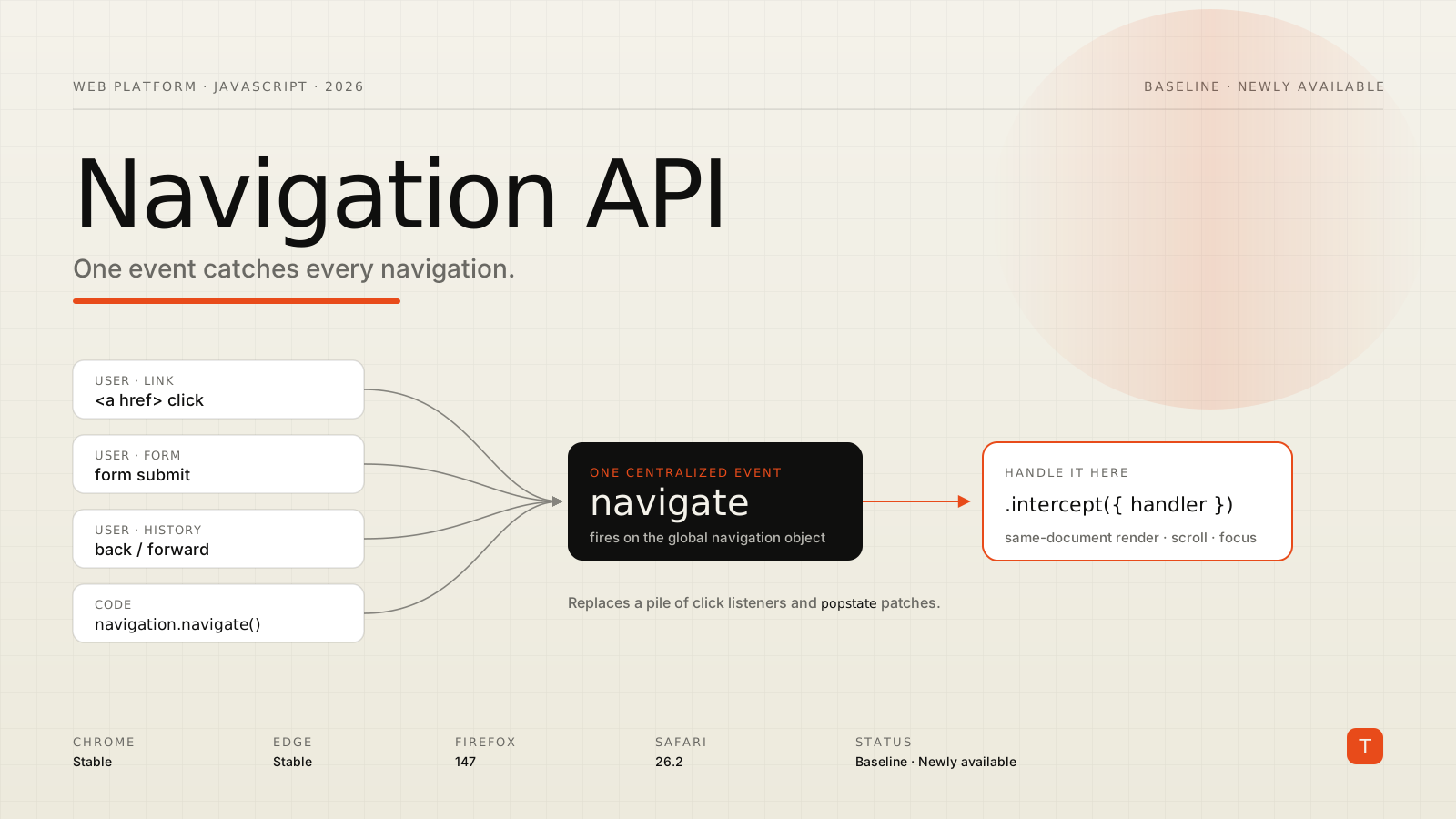
For most of the single-page-application era, client-side routing has been built on an API that was never meant for the job. The History API gives you pushState, replaceState, and a popstate event — and that is roughly it. To catch a navigation, you wire click listeners onto every <a>, hope you also caught the form submissions and image maps, and then bolt on popstate for the back button. The Navigation API replaces that whole arrangement with one centralized event, and as of 2026 it is finally something you can target directly: the Navigation API is Baseline Newly available, with the last engines to ship being Firefox 147 and Safari 26.2 (web.dev, InfoQ).
That status change is the news. The API itself landed in Chrome back in version 102, but a router you can only ship in one browser is a research project, not a foundation. Cross-engine support is what makes it worth rebuilding on.
Why the History API hurt
If you have ever hand-rolled SPA routing, you have written some version of this:
function updatePage(event) {
  event.preventDefault(); // we're handling this link
  window.history.pushState(null, '', event.target.href);
  // TODO: set up page based on new URL
}
const links = [...document.querySelectorAll('a[href]')];
links.forEach(link => link.addEventListener('click', updatePage));
It works until it doesn't. Links get added and removed as the page re-renders, so you re-bind or delegate. Forms, location.assign(), and back/forward traversal all bypass this code entirely, so you grow a second handler for popstate and a few more special cases. The result is routing logic spread across several mechanisms that each see a slice of what the user actually did.
The Navigation API collapses all of that into a single event on a global navigation object. As the Chrome for Developers guide puts it, the navigate event is centralized: it fires for every navigation — user-initiated or programmatic, link or form or back button — in one place.
One event to catch every navigation
The core of an app router is now a single listener:
navigation.addEventListener('navigate', navigateEvent => {
  // Let the browser handle anything we shouldn't take over.
  if (shouldNotIntercept(navigateEvent)) return;

  const url = new URL(navigateEvent.destination.url);

  if (url.pathname === '/') {
    navigateEvent.intercept({ handler: loadIndexPage });
  } else if (url.pathname.startsWith('/articles/')) {
    navigateEvent.intercept({ handler: () => loadArticle(url.pathname) });
  }
});
Calling intercept({ handler }) tells the browser this is a same-document navigation: keep the user here, run my callback, and treat the time it takes as the duration of the navigation. The alternative is preventDefault(), which cancels the navigation outright. Both have limits that exist for good reasons — you cannot intercept() a cross-origin navigation, and you cannot preventDefault() a back/forward traversal, because trapping users on a page is exactly the abuse the platform refuses to allow.
The navigateEvent carries everything you need to decide whether a navigation is yours to handle. A typical guard:
function shouldNotIntercept(navigateEvent) {
  return (
    !navigateEvent.canIntercept ||
    // Same-document hash change: let the browser scroll.
    navigateEvent.hashChange ||
    // A download link: let the browser download.
    navigateEvent.downloadRequest ||
    // A POST form submission: let it reach the server.
    navigateEvent.formData
  );
}
canIntercept, hashChange, downloadRequest, formData, and navigationType ("reload", "push", "replace", or "traverse") give you a precise read on what kind of navigation you are looking at — far more than a click listener ever knew.
Intercept, then show something immediately
When you intercept, the destination URL takes effect just before your handler runs. If you wait on a slow fetch before touching the DOM, you get a window where the new URL is showing the old content — and relative URLs resolve against the new path while the old page is still on screen. The recommended pattern is to paint a placeholder first, then fill it:
navigation.addEventListener('navigate', navigateEvent => {
  if (shouldNotIntercept(navigateEvent)) return;
  const url = new URL(navigateEvent.destination.url);

  if (url.pathname.startsWith('/articles/')) {
    navigateEvent.intercept({
      async handler() {
        renderArticlePlaceholder();          // instant feedback
        const res = await fetch(`/api/article?path=${url.pathname}`, {
          signal: navigateEvent.signal,       // cancel if preempted
        });
        renderArticle(await res.json());
      },
    });
  }
});
Two things in that snippet pay off in real performance terms. The placeholder makes the navigation feel instant because you respond on the same tick the user acted. And navigateEvent.signal is an AbortSignal that fires when the navigation becomes redundant — the user clicked a different link, or hit stop. Pass it to fetch() and in-flight requests for an abandoned navigation cancel themselves, saving bandwidth and preventing a stale response from overwriting the page the user actually wants.
Scroll, focus, and loading state you get for free
Because the browser now understands that an SPA navigation is in progress, it handles things that routers used to fake. Scrolling is automatic: a push or replace scrolls to the URL fragment or resets to the top, and a reload or traversal restores the previous scroll position. You can opt out with intercept({ scroll: 'manual' }), or trigger it early with navigateEvent.scroll(). Focus is reset the same way — to the first autofocus element, or <body> — which is a real accessibility win that most hand-rolled routers skip. Chrome also drives its native loading indicator and stop button off the promise your handler returns.
Completion is centralized too. When your handler's promise resolves, navigatesuccess fires; if it rejects, navigateerror does, with the error attached:
navigation.addEventListener('navigatesuccess', () => {
  loadingIndicator.hidden = true;
});

navigation.addEventListener('navigateerror', event => {
  loadingIndicator.hidden = true;
  showMessage(`Failed to load page: ${event.message}`);
});
Any error thrown while setting up a page — including a rejected fetch() — routes to navigateerror, so you get one place to handle failed navigations instead of try/catch scattered through every route.
History entries and state, done properly
navigation.currentEntry describes where the user is, with a stable key you can hold onto and jump back to with navigation.traverseTo(key). navigation.entries() returns the full list the user has moved through — something the History API never exposed. State lives on the entry and is set during navigation rather than mutated in place:
navigation.navigate('/dashboard', { state: { tab: 'overview' } });
// later, in your navigate listener:
navigation.addEventListener('navigate', e => {
  const state = e.destination.getState();
});
Programmatic navigation flows through the same listener: navigation.navigate('/path') returns { committed, finished } promises so you can await either the URL change or the fully settled navigation.
Caveats before you ship
Baseline Newly available is not Widely available. The API works in current releases, but a slice of your users will be a version or two behind, so feature-detect and degrade. Server-side rendering plus normal <a href> links is the right fallback — if the Navigation API is absent, those links do a full page load, which is correct, just less slick. One engine-specific gap worth noting: Safari's implementation currently lacks the precommitHandler capability that lets you defer the URL change, per the InfoQ report, so build around the commit-then-render flow shown above rather than depending on deferral.
Detection is a one-liner:
if ('navigation' in window) {
  navigation.addEventListener('navigate', handleNavigate);
} else {
  // Fall back to full-page navigation or your existing router.
}
Takeaways
The Navigation API turns SPA routing from a pile of click listeners and popstate patches into a single, well-specified event. Now that it is Baseline across Chrome, Edge, Firefox, and Safari, three moves make sense this quarter: replace your click-delegation router core with one navigate listener and a shouldNotIntercept guard; wire navigateEvent.signal into every fetch so abandoned navigations cancel themselves; and lean on the built-in scroll, focus, and navigateerror handling instead of reimplementing it. Keep server-rendered links as the fallback, feature-detect with 'navigation' in window, and the migration stays low-risk while removing a meaningful amount of routing code you no longer have to own.
For the full surface area, the MDN Navigation API reference and the Chrome for Developers guide are the two documents to keep open.