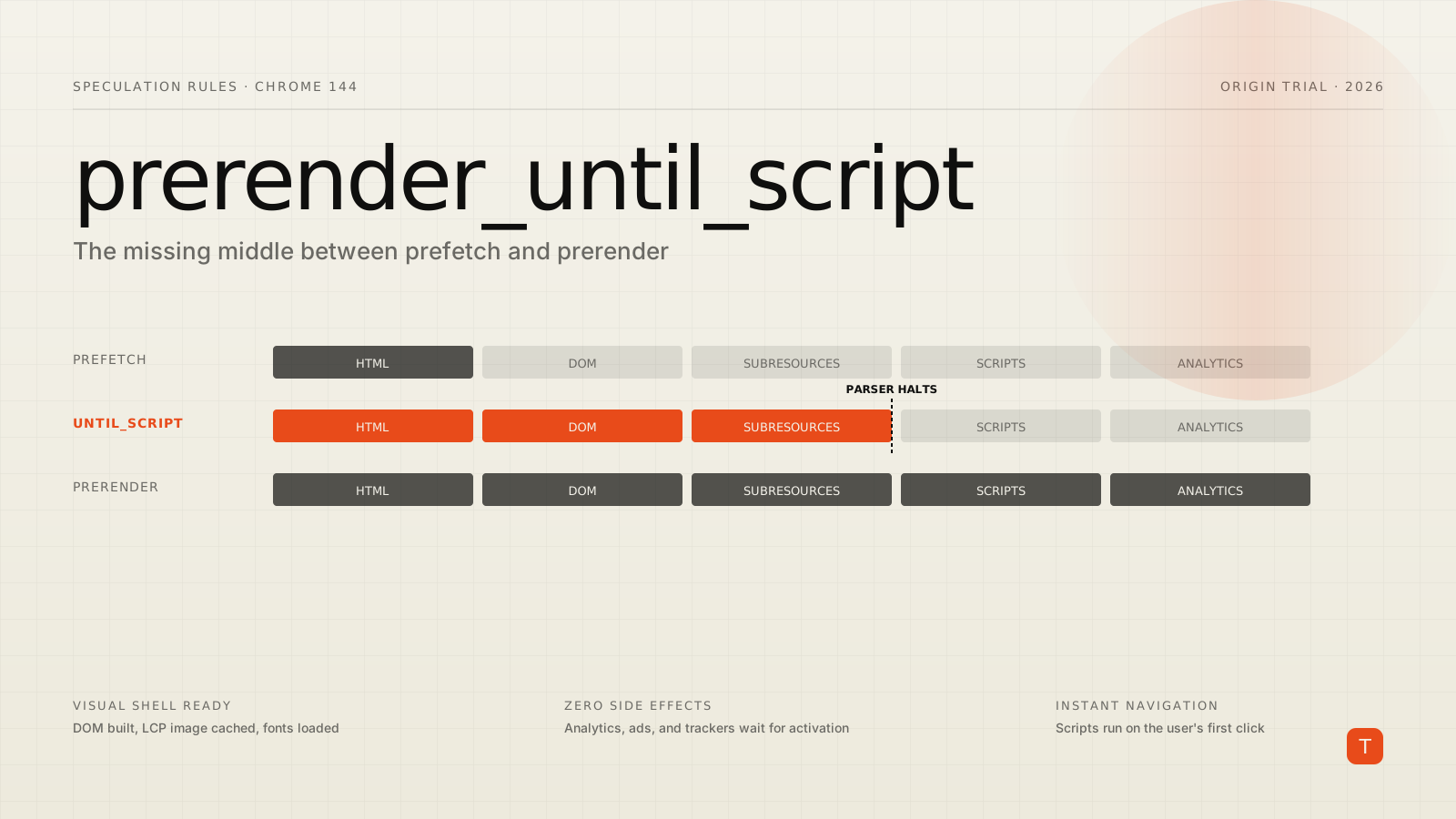
If you have ever tried to deploy the Speculation Rules API on a real production site, you already know the trade-off. prefetch is cheap and safe, but it only fetches the HTML — the browser still has to discover and download subresources after the click. Full prerender makes the next navigation feel instant, but it runs your JavaScript in the background, fires analytics for pages the user may never see, and burns memory.
Chrome 144, which started rolling out at the beginning of 2026, is now testing a third option through an origin trial: prerender_until_script. It builds the DOM and pulls down subresources like a full prerender, but it stops at the first script execution point. For content-heavy sites whose biggest performance problem is third-party JavaScript, this is the option a lot of teams have been waiting for.
What the new mode actually does
The mechanic is described in the official Chrome blog post and on the WICG side of the spec. When the speculation engine activates a prerender_until_script rule, the browser:
- Fetches the target document the same way
prefetchwould. - Streams the response through the HTML parser and constructs the DOM.
- Runs the preload scanner, so high-priority CSS and the LCP image start downloading immediately.
- Halts at the first synchronous
<script>it encounters. Async and deferred scripts are downloaded but not executed.
The page sits in memory with its visual shell ready: layout calculated, fonts and images warming the cache, the LCP candidate likely already painted into a hidden buffer. When the user clicks, Chrome activates the prerendered document, the parser releases, and your JavaScript runs at that moment — not before.
The difference between the three modes lines up neatly:
| Action | Fetch HTML | Build DOM | Fetch subresources | Run JS | Analytics fire |
|---|---|---|---|---|---|
prefetch |
Yes | No | No | No | No |
prerender_until_script |
Yes | Yes | Yes | No | No |
prerender |
Yes | Yes | Yes | Yes | Yes (unless guarded) |
Arjen Karel's writeup at corewebvitals.io frames it well: you get the visual readiness of a full prerender without the cost and risk of executing application logic. For an e-commerce listing page that loads a chat widget, an A/B testing snippet, a personalization script, and a customer data platform, that distinction is worth a lot of milliseconds.
The implementation
The rule slots into the same <script type="speculationrules"> block as every other speculation rule. Because the trigger key is new and gated behind an origin trial, browsers that don't recognize prerender_until_script will silently drop the rule. Pair it with a prefetch block as a fallback, and Chrome picks the most capable action available without any user-agent sniffing.
<script type="speculationrules">
{
  "prerender_until_script": [
    {
      "where": {
        "and": [
          { "href_matches": "/*" },
          { "not": { "href_matches": "/cart" } },
          { "not": { "href_matches": "/logout" } }
        ]
      },
      "eagerness": "moderate"
    }
  ],
  "prefetch": [
    {
      "where": {
        "and": [
          { "href_matches": "/*" },
          { "not": { "href_matches": "/cart" } },
          { "not": { "href_matches": "/logout" } }
        ]
      },
      "eagerness": "moderate"
    }
  ]
}
</script>
A few things to notice. The source key is optional since Chrome 122 — the presence of where implies document rules. The eagerness: "moderate" setting triggers the speculation when the pointer hovers a link for 200 milliseconds, which is the right default for almost any production site. immediate and eager are too aggressive for content pages with heavy payloads; conservative waits for pointerdown and rarely has enough lead time to finish.
State-changing URLs need to be excluded explicitly. /logout, /cart, /checkout/confirm, anything that runs a side effect from a GET request — drop them in the not clause. prerender_until_script blocks JavaScript, but it does not block the document fetch itself, so a server that mutates state on GET will still see traffic it didn't expect.
Enabling the trial
Since this is an origin trial running from Chrome 144 through Chrome 150 (roughly January through mid-2026), there are two ways to switch it on:
<meta http-equiv="origin-trial" content="YOUR_TOKEN_HERE">
Register for a token at the Chrome Origin Trials dashboard, drop the meta tag into your <head>, and the feature activates for visitors on Chrome 144 and above. For local development and CI, enable chrome://flags/#prerender-until-script instead. There is no Intent to Ship yet, so plan for the trial to expire — keep the prefetch fallback in place, and make sure your build pipeline can rotate the token without a code change.
Why this matters for analytics, ads, and consent
The single biggest reason teams shy away from full prerender is that it executes your JavaScript before the user has shown any intent. That means your analytics fire impressions for pages nobody saw, your ad tags request creatives that won't render, and your consent banner may load against a "page" the user never actually visited.
You can guard against all of this with document.prerendering and the prerenderingchange event, but it requires touching every script that has side effects on load — and convincing every third-party vendor to do the same. The Chrome team's prerender documentation goes through this in detail, and the answer is rarely fast in a vendor-heavy codebase.
prerender_until_script flips the problem. Because the parser halts at the first script, none of that JavaScript runs until the activation event:
// In a prerender_until_script document, this fires on activation —
// which is functionally the user's first interaction.
document.addEventListener("prerenderingchange", () => {
  // analytics, ads, consent banner, anything with a side effect
  initAnalytics();
});

// You can also gate any inline code on the same signal.
if (document.prerendering) {
  document.addEventListener("prerenderingchange", () => {
    fireImpressionPixel();
  }, { once: true });
} else {
  fireImpressionPixel();
}
There is one gotcha. The parser halts at <script> elements, but it does not halt at inline event handlers further up in the DOM. An <img onload="track()"> declared before any blocking script will still execute, because the parser reaches it before it hits the halt point. If you have tracking pixels using inline handlers, audit them — they will fire during a prerender_until_script even though your main scripts don't.
Squeezing more out of it
The depth of the visual shell that gets built is proportional to how late your first blocking script appears. Two practical moves:
Defer or async every analytics, consent, and personalization script. If your tag manager or CMP injects a synchronous script at the top of <head>, the parser halts on line one and the new mode degrades to something very close to prefetch. Modern tag managers all support async; check that your template actually applies it.
Move inline early scripts out of the critical path. Inline <script>{...}</script> blocks count as blocking. Even small ones — feature flags, theme detection, "is mobile" sniffers — kill the prerender at the spot they appear. Either move them after the LCP image or convert them to defer external files.
The 2025 Web Almanac performance chapter reports that 35% of mobile pages now use the Speculation Rules API, much of that adoption driven by WordPress 6.8 baking it into core. The Chrome team has been iterating on the API steadily — document rules, the Speculation-Rules HTTP header, No-Vary-Search, eagerness limits — and prerender_until_script is the most useful addition of the last twelve months for sites that can't afford the side effects of a full prerender.
Actionable takeaways
Three things worth doing in the next sprint:
First, ship a prerender_until_script block on a single high-traffic content template — a blog index, a product listing — with a prefetch fallback. The Origin Trial token costs nothing, and the change is fully reversible by removing the rule. Measure LCP in field data, not lab data; the gains show up under real network conditions.
Second, audit every synchronous <script> and inline handler that runs in the first 5KB of your HTML. Anything you can defer, defer. The depth of the prerendered shell is directly determined by where the parser halts.
Third, write down which routes are unsafe to speculate. /logout, /checkout/confirm, any GET endpoint with side effects, any URL that uses one-time tokens. Encode the list in your speculation rules and review it the same way you would a robots.txt — these are routes the browser is allowed to touch on the user's behalf without a click.
The web platform has finally given us a way to prebuild a page without prematurely declaring that the user visited it. That's a more honest contract with both users and the third parties on your stack — and on a typical content site, it can collapse the visible navigation delay close to zero without rewriting a line of analytics code.