Vue's biggest runtime change in years is now close enough to touch. As of this week, Vue 3.6.0-beta.16 shipped (June 17, 2026), and the beta line has been almost entirely about stabilizing one feature: Vapor Mode, a compilation strategy that drops the virtual DOM for components that opt in.
If you build or maintain Vue apps, this is worth understanding now rather than after the stable release. Vapor Mode is opt-in and incremental, which means the smart move is to learn where it pays off and start measuring on real screens before it lands as a default recommendation.
What Vapor Mode actually changes
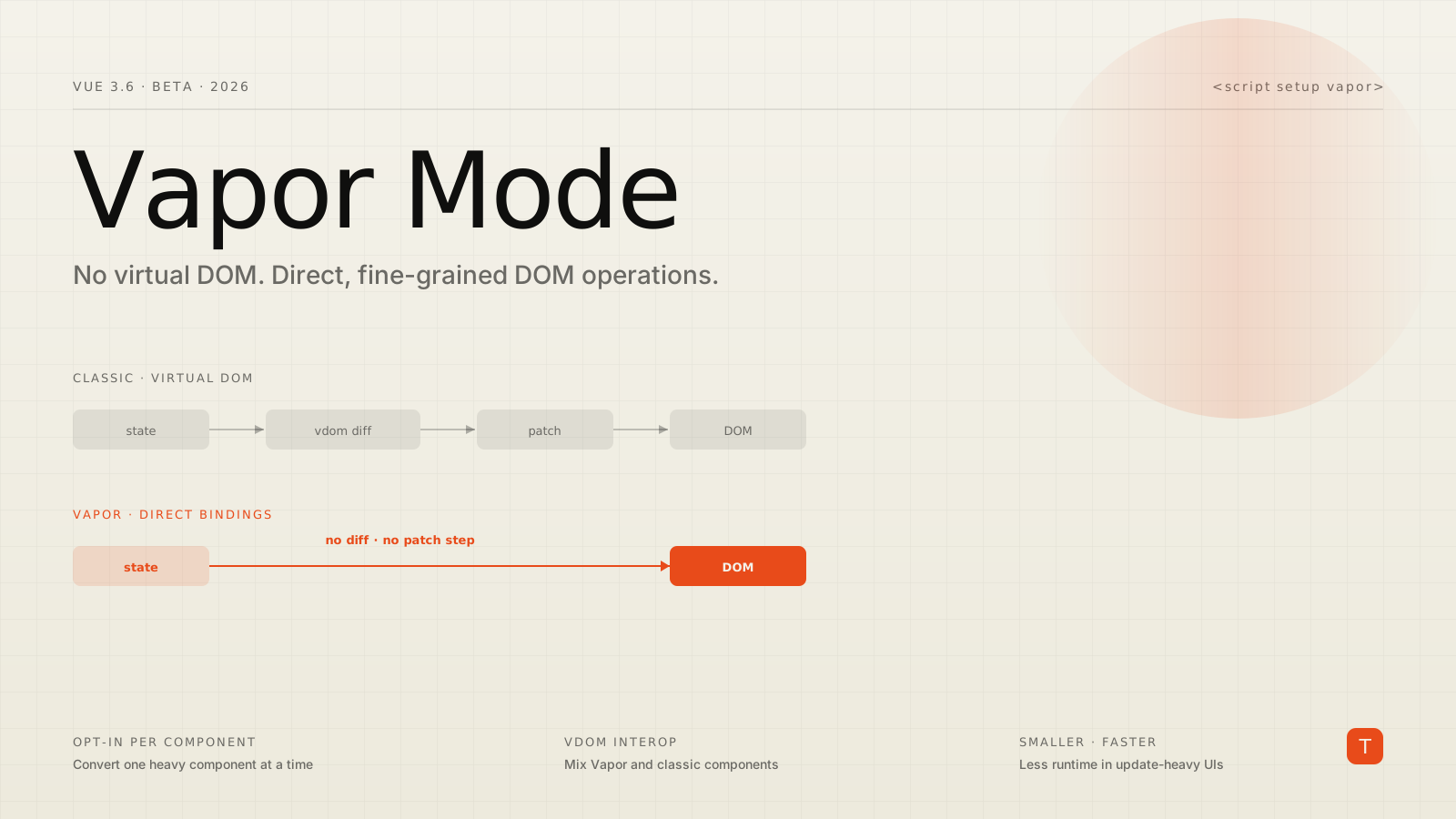
Classic Vue compiles your templates into render functions that produce a virtual DOM: an in-memory JavaScript tree that Vue diffs against the previous tree and patches onto the real DOM. That model is flexible and has served Vue well, but the diffing work scales with the size of your component tree, and the runtime needed to do it ships in your bundle.
Vapor Mode takes a different path. Instead of producing a virtual DOM, the compiler emits fine-grained DOM operations wired directly to Vue's reactivity system. When a reactive value changes, only the exact DOM node bound to it updates. There is no tree to diff and no per-render reconciliation. This is the same broad approach that signals-based frameworks like Solid have popularized, now brought into Vue's existing reactivity model and component authoring style.
The two practical consequences, per the Vue team's own framing in the 3.6 release notes, are smaller bundles for Vapor-only components and lower update overhead in reactive-heavy UIs. Vue's documentation positions Vapor as most valuable in exactly the places virtual DOM diffing hurts most: large lists, data grids, and dashboards where many small updates fire frequently.
How you turn it on
The ergonomics are deliberately small. You mark a component as Vapor with an attribute on the script block:
<script setup vapor>
import { ref } from 'vue'
const count = ref(0)
</script>

<template>
  <button @click="count++">Clicked {{ count }} times</button>
</template>
That is the entire opt-in. The component author still writes <script setup>, refs, computed values, and templates the way they always have. What changes is the compiler output, not your mental model. This is the part teams tend to underestimate: Vapor is not a rewrite of how you write Vue, it is a different compilation target for the same code.
Because Vapor is per-component, you do not flip a switch on the whole app. You can convert a single heavy table or chart component, leave everything else on the classic renderer, and ship. That granularity is what makes it realistic to adopt inside an existing codebase rather than only in greenfield projects.
Mixing Vapor and classic components
The thing that makes incremental adoption viable in practice is interop. Vue 3.6 ships a plugin that lets Vapor and virtual-DOM components live in the same tree and pass slots, props, and lifecycle hooks across the boundary:
import { createApp, vaporInteropPlugin } from 'vue'
import App from './App.vue'

createApp(App)
  .use(vaporInteropPlugin)
  .mount('#app')
Much of the beta work has gone into making this boundary reliable: aligning mount, update, and unmount hook ordering between the two modes, fixing slot handling, and getting context to pass correctly in both directions. The honest caveat is that third-party component libraries built on deep virtual-DOM assumptions can still hit rough edges across the boundary. The pragmatic pattern the Vue team recommends is to keep Vapor and classic components in distinct regions of your UI where you can, rather than interleaving them at every level.
Why the beta has taken its time
It is tempting to read "feature-complete beta" as "ready to ship in production." It is not, and the changelog explains why. The 3.6 beta cycle, which began in late December 2025 and is now sixteen betas deep, has been dominated by correctness work rather than new capability:
- Hydration fixes for multi-root components, async setups, slots, and fragment anchors, which matter for any SSR app using Nuxt or similar
- Edge cases around
KeepAlive,Teleport,Transition, andTransitionGroupwithv-for, all of which have historically been tricky to get right without a virtual DOM - Tree-shaking improvements so apps only pay for the features they use
- A static template hydration fast path to speed up initial render of mostly-static content
None of that is glamorous, but it is exactly the work that determines whether a renderer is trustworthy. Server-side rendering and hydration are where rendering strategies usually break, and a new render path has to prove itself there before it earns production traffic.
What this means for your roadmap
The headline benchmarks circulating in the community are eye-catching, with claims of dramatic render-time reductions and bundle savings for Vapor-only components. Treat those as directional rather than as a promise about your application. The realistic expectation, and the one the Vue team itself sets, is meaningful gains concentrated in update-heavy interfaces, not a uniform speedup across every page. A mostly-static marketing page will not get much from Vapor, because there is little diffing happening there in the first place.
Here is a sober way to approach it:
- Identify your hot spots. Profile interactions on your heaviest screens, typically large tables, filterable lists, live dashboards, or anything that re-renders on every keystroke. These are the components where eliminating virtual DOM diffing has the largest payoff.
- Prototype, do not migrate. Convert one of those components to
<script setup vapor>in a branch and measure update latency and bundle size with and without it. Let the numbers from your app, not a benchmark repo, drive the decision. - Stay on the classic renderer for production today. Vue 3.6 is in beta. Classic virtual-DOM mode remains fully supported and unchanged, so there is no pressure to move. Use the beta to learn and to build internal conviction.
- Plan for opt-in, not all-in. Even after 3.6 ships stable, Vapor is expected to stay opt-in for some time. Design your adoption as a series of targeted component conversions, not a big-bang rewrite.
The bigger picture
Vapor Mode is part of an industry-wide move toward fine-grained, signals-based reactivity and away from per-render diffing. Vue's version is notable because it keeps the authoring experience teams already know while swapping out the engine underneath for the parts of an app that need it. That combination, familiar syntax plus a faster compile target, is what makes it a low-risk experiment for most teams.
For now, the actionable takeaways are simple. Vue 3.6 is in active beta and Vapor is feature-complete but not yet production-blessed. Your existing Vue 3.5 apps keep working untouched. The right thing to do this quarter is to find your update-heavy components, prototype them in Vapor on a branch, and measure. When the stable release arrives, you will already know exactly where it earns its keep in your codebase, and you will have spent zero production risk getting there.
Sources: Vue.js 3.6 release notes on GitHub, VersionLog Vue.js 3.6 release history, and the Vue core repository.