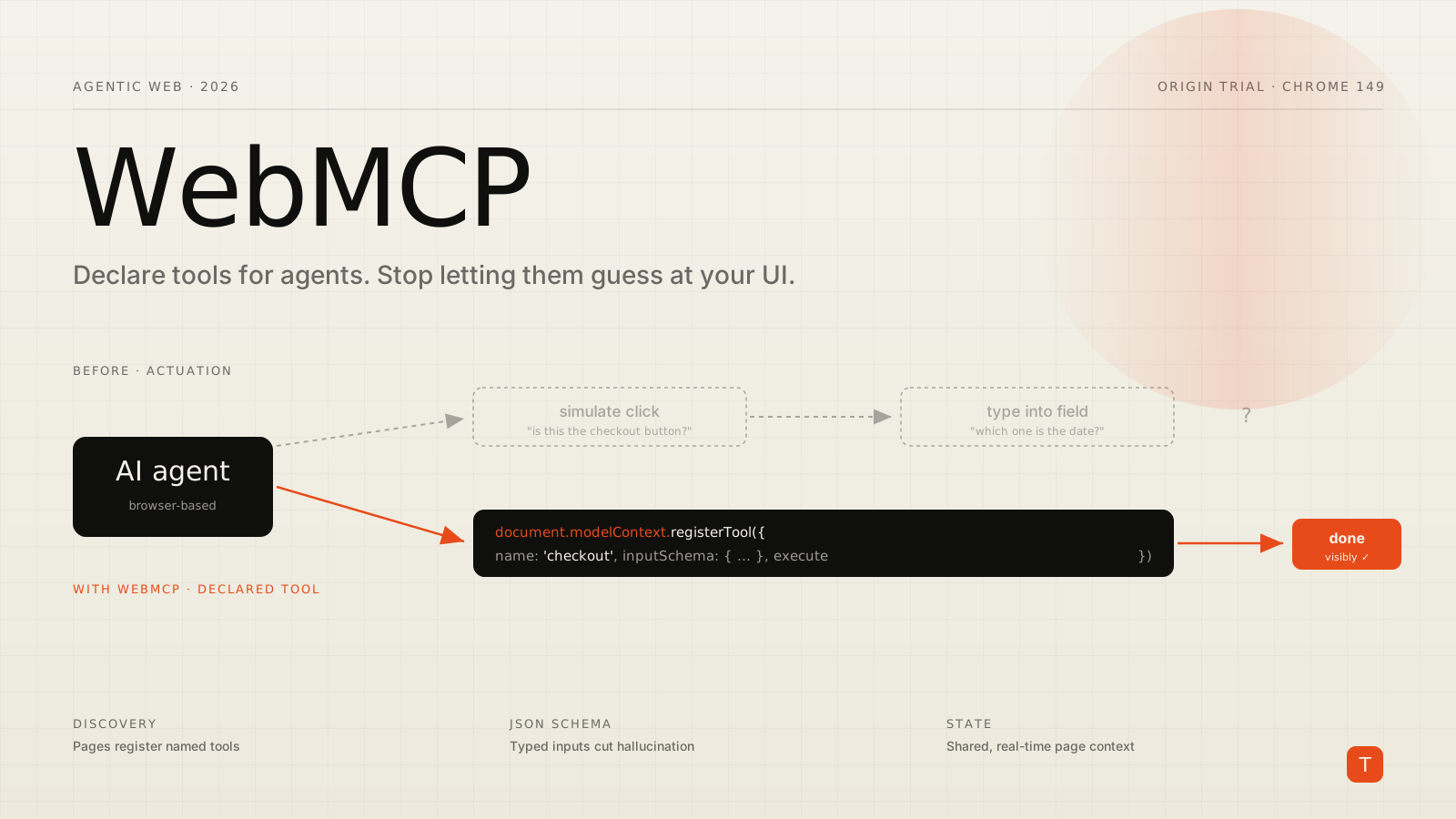
AI agents are already browsing the web on behalf of users, and the way they do it today is brittle. An agent reads your page, infers what a button or field is for, and then actuates — it simulates the mouse clicks and keystrokes a human would make to complete a task. Every step in that chain is a guess, and every guess is a chance to click the wrong control, fill the wrong field, or stall on a date picker it does not understand.
WebMCP is Chrome and Edge's answer to that problem. Announced at Google I/O 2026 and now heading into an origin trial in Chrome 149, it is a proposed open web standard that lets your site declare structured tools for agents instead of leaving them to reverse-engineer your interface (Chrome for Developers, WebMCP docs). Instead of an agent inferring that a button means "check out," your page hands it a checkout tool with a defined input schema. The agent calls a machine-friendly function; your code runs the action visibly, on your terms.
Actuation versus tools
It helps to name the thing WebMCP replaces. Chrome's docs call it actuation: an agent simulating manual mouse clicks and text input as though it were the human user. Actuation can handle a single step like clicking a link, or a long chain like completing a purchase — and the longer the chain, the more room there is for misinterpretation (WebMCP docs).
The contrast is the whole pitch. With actuation, the agent reviews each element to infer its purpose. With WebMCP, the website declares it. That buys three things the standard calls out: discovery, a standard way for pages to register tools like checkout or filter_results; JSON Schemas, explicit input and output definitions that reduce hallucination; and state, a shared understanding of the current page context so the agent knows what it can act on in real time.
Crucially, tools execute on your page visibly. The user watches the action happen in your interface, which keeps your brand and your human-centered design choices intact instead of letting an agent drive a headless puppet of your site.
The imperative API
There are two ways to define tools. The imperative API uses plain JavaScript and is the right choice when an action needs real logic. You register a tool on document.modelContext with a name, a description, an input schema, and an execute function (Imperative API):
document.modelContext.registerTool({
  name: 'get_order_status',
  description:
    'Search orders in a given timeframe. Returns order number, shipping status and location.',
  inputSchema: {
    type: 'object',
    properties: {
      timeframe: {
        type: 'string',
        enum: ['today', 'yesterday', 'last_7_days', 'last_30_days', 'last_6_months'],
        description: 'Timeframe for the order lookup.',
      },
    },
    required: ['timeframe'],
  },
  execute: async ({ timeframe }) => {
    const orders = await fetchOrders(timeframe);
    return JSON.stringify(orders); // return a string the agent can read
  },
});
The description and the schema are not decoration — they are the contract the agent reasons over. A vague description or a loose schema is exactly where hallucination creeps back in, so this is where your effort should go.
Two details matter for real apps. First, tools are not permanent. You register them with an optional AbortSignal and remove them by aborting the controller, which is how you scope a tool to a particular view or app state:
const controller = new AbortController();

document.modelContext.registerTool(
  {
    name: 'addTodo',
    description: 'Add a new item to the to-do list',
    inputSchema: {
      type: 'object',
      properties: { text: { type: 'string' } },
    },
    execute: async ({ text }) => `Added to-do: ${text}`,
    annotations: { readOnlyHint: false, untrustedContentHint: true },
  },
  { signal: controller.signal }
);

// Later, when the view unmounts:
controller.abort();
Second, a frame can react to the tool set changing. Listen for toolchange on document.modelContext to keep a chat UI or your own orchestration in sync as tools come and go:
document.modelContext.addEventListener('toolchange', () => {
  // The list of available tools has changed — re-read it if you cache it.
});
One naming note worth flagging now so you do not build on the wrong surface: navigator.modelContext is deprecated in Chrome 150 in favor of document.modelContext, and tool registration moved there. Write against document.modelContext from the start.
The declarative API for forms
Not every tool needs JavaScript. The declarative API lets you annotate standard HTML form elements so an agent knows how to fill and submit them, which covers a large share of real-world tasks: support requests, applications, reservations, search filters. Because it builds on ordinary forms, it degrades gracefully — the form still works for humans exactly as it did before, and the annotations only come into play when an agent is present (WebMCP docs). Reach for the declarative path when an action maps cleanly onto a form, and the imperative path when it needs logic, multi-step state, or a custom control like a date picker an agent would otherwise fumble.
Discovering and running tools
Tools are not just for some external agent — your own code can enumerate and call them. getTools() returns the tools the calling document is allowed to see, and executeTool() runs one with arguments passed as a JSON string:
const tools = await document.modelContext.getTools();
const orderTool = tools.find(t => t.name === 'get_order_status');

const result = await document.modelContext.executeTool(
  orderTool,
  '{"timeframe": "last_7_days"}'
);
This is what makes WebMCP testable and composable. You can build a page-local agent that reads the registered tools and drives them, which is exactly how Chrome's own demos wire a chat interface to a page's tools.
Security is not an afterthought
Exposing callable functions to an agent raises obvious questions, and the design has explicit answers. By default getTools() returns only same-origin tools. Both APIs are gated behind a tools Permissions Policy that defaults to self, so a cross-origin iframe cannot register tools unless the embedding page opts in with allow="tools" (WebMCP docs).
Cross-origin sharing is deliberately double-locked. A tool is only visible to another origin if the registering page lists that origin in exposedTo, and the consuming page explicitly asks for it via fromOrigins in getTools() (Imperative API):
// On partner.org — expose a tool to a specific origin
document.modelContext.registerTool(
  { name: 'my_shared_tool', description: 'Shared across origins', /* ... */ },
  { exposedTo: ['https://example.com'] }
);

// On example.com — you must still ask for it
const allTools = await document.modelContext.getTools({
  fromOrigins: ['https://partner.org'],
});
For sensitive actions like a purchase, the guidance is to keep a human in the loop with a confirmation step rather than letting a tool complete the transaction silently. Treat agent-supplied input as untrusted — note the untrustedContentHint annotation above — and validate it the same way you validate anything coming from outside your trust boundary.
Where it runs, and where it does not
Be clear-eyed about the limits before you plan around this. WebMCP is a developer trial today, available behind chrome://flags/#enable-webmcp-testing for local work, with the origin trial starting in Chrome 149 (Imperative API). It is an incubation between the Chrome and Edge teams in the W3C, not a finished, multi-browser standard, and the API surface is still subject to change.
There are real constraints, too. Tool calls run in JavaScript, so a visible tab or webview must be open — there is no headless tool calling. Complex interfaces may need refactoring to expose clean state. And discovery requires visiting a site directly; there is no global registry that tells an agent your tools exist before it arrives.
What to do now
WebMCP is worth treating as a progressive enhancement you prototype this quarter, not a rewrite. Three concrete moves:
Start by mapping your two or three highest-value agent tasks — the booking, the checkout, the support-ticket flow — and sketch each as a tool with a tight description and JSON Schema. The schema work is the work; everything else is plumbing. Then prototype the imperative API behind the flag, registering and unregistering tools with AbortSignal so they track your app's state instead of leaking across views. Finally, decide your trust boundaries up front: keep tools same-origin unless you have a deliberate reason to share, gate cross-origin embeds with the tools Permissions Policy, and require confirmation for anything that spends money or changes data.
The bet behind WebMCP is that the agentic web works better when sites describe their own capabilities than when agents guess at them — and for that to pay off, the descriptions have to come from people who understand the workflow. That is design and engineering work against a spec that is still moving, so treat anything you build as a prototype. For the current state of the API, keep the WebMCP documentation and the explainer on GitHub open as you build.